

Athena Mobile
Critical seismicity data at your fingertips.
Access real-time seismicity data on the go
Wherever your work day takes you, critical seismicity data is always at your fingertips with Athena Mobile. Designed as a companion application to our fully-featured Athena platform, be alerted to new seismicity in the vicinity of your operations on your mobile device, then quickly validate and assess the event to determine if action is required. When it is, delve into Athena for further analysis, inspection and reaction.
Event Notifications
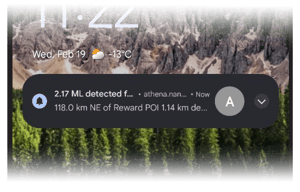
- Be alerted to events via push notifications
- See details including magnitude, network, depth and more
- Tap the notification to go directly to the event details page
Events Page
- Access all Athena instances and configured Areas of Interest (AOI)
- View defined map layers, seismic stations and events on the interactive map
- Show or hide any combination of map layers
- Filter events by magnitude, time range, source and analysis types
- Click through on any event for more details

Event Details Page
- Map view localized on the event
- At-a-glance event details, including:
- Magnitude
- Depth
- Analysis type
- Date and time
- Waveforms
- Coordinates

Seismicity monitoring goes mobile
Athena Mobile’s modern, responsive user interface displays content based on the device you’re using.
If you’re monitoring seismicity at multiple active operational areas, easily access and get notifications for all of them by logging into a single site and switching between them.
AOI and map layer configurations are the same between Athena and Athena Mobile ensuring accuracy no matter what device you’re using.
Athena Mobile provides the most important data about each event, ensuring you can quickly review and determine next steps.
Simply browse to Athena Mobile on your device and add to your home screen.
Get started with Athena Mobile today!
Athena Mobile is supported on iOS and Android devices using Safari and Chrome. There is no additional cost for our Seismicity Monitoring Service customers to use Athena Mobile. To start using Athena Mobile:
- Browse to athena.nanometrics.net on your mobile device
- Log in using your Athena credentials
To set-up notifications on your device, click Enable when prompted or click the Notification icon.
Don’t have access to Athena at your organization?
Contact the Geophysical Services team (geophysical-services@nanometrics.ca) to get set-up.
